Free Notion Client Tracker Template for Solopreneurs
Free · No email required
What’s inside
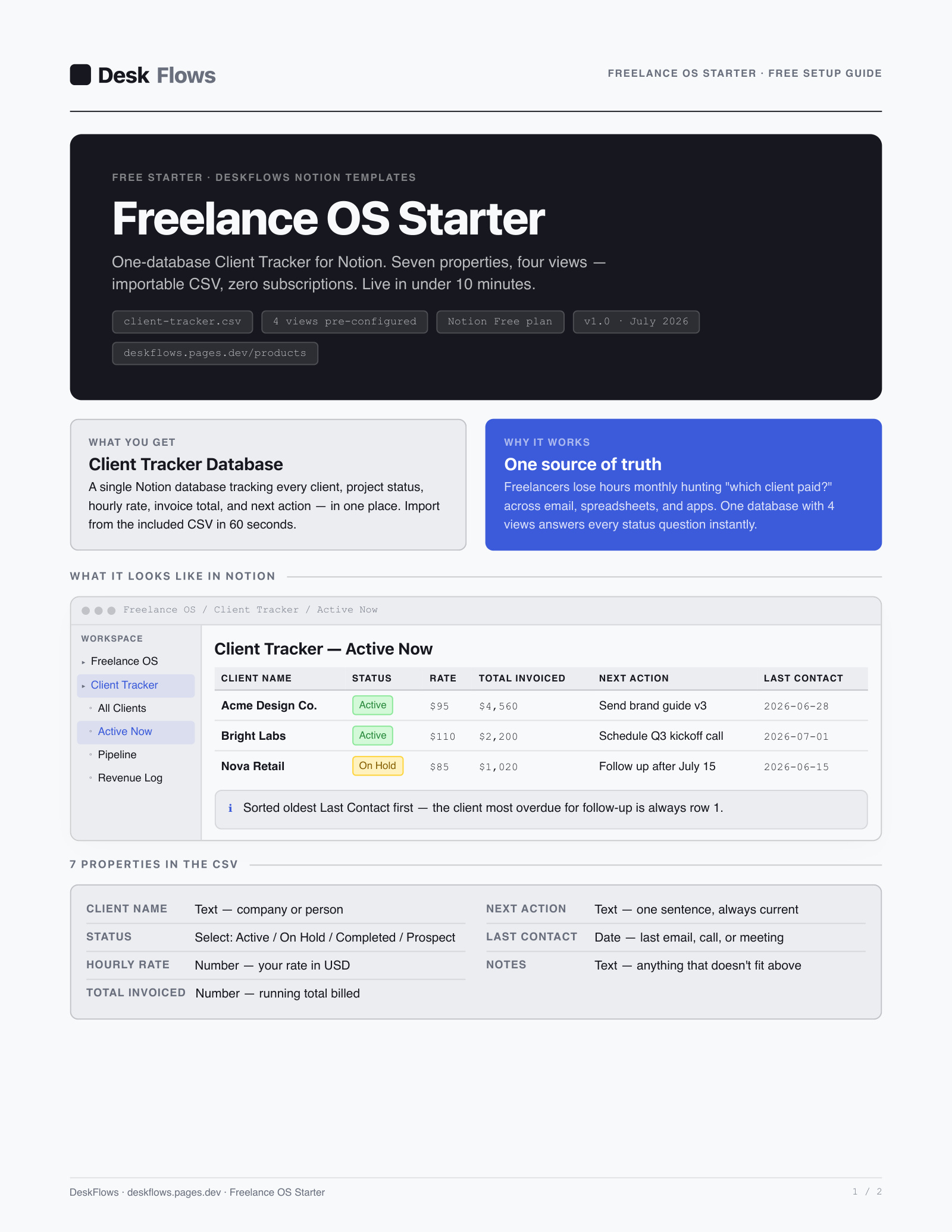
- Client Tracker database — 7 properties: Client Name, Status, Hourly Rate, Total Invoiced, Next Action, Last Contact, Notes
- 4 pre-built views — All Clients, Active Now (oldest-contact-first), Pipeline (board by status), Revenue Log (sorted by total invoiced)
- 2-page PDF setup guide — 5-step CSV import walkthrough, live in Notion in under 10 minutes
- Works on the Notion Free plan — no subscription needed to use it
One zip: client-tracker.csv + 2-page PDF guide · No account needed
What you're actually getting
This is not a Notion "duplicate" link — it's a real CSV file (client-tracker.csv) plus a
2-page PDF that walks through importing it. That distinction matters: a CSV import means the column types
(Select for Status, Number for Hourly Rate and Total Invoiced, Date for Last Contact) get set once, by you,
in about 90 seconds — not inherited sight-unseen from someone else's template structure.
The tracker ships pre-seeded with five anonymized example rows so you can see the views working before you add real clients. Delete them, import your own client list, and the Active Now view sorts oldest-contact-first — so the client you're most overdue to follow up with is always row one.
This sample is deliberately the first room of a larger system, not a crippled tease: it fully replaces a spreadsheet client list on its own. The paid Freelance OS kit ($24 one-time) adds three more linked databases — Client CRM, Project Pipeline, and Invoice Log — that connect back to this same tracker so a client row shows every project and invoice tied to it automatically.
Common questions
Do I need a paid Notion plan to use this client tracker?
No. The template is one database with four views — well within the Notion Free plan’s limits for solo use. See our full breakdown of what the Notion Free plan actually caps in 2026 if you’re close to any other limit.
Is this a Notion template link, or a file I download?
It’s a file you download — one small zip containing the CSV (client-tracker.csv) and a 2-page PDF setup guide, not a Notion "duplicate" link. You import the CSV as a new database in your own workspace, which means you own the file outright and can edit the raw data before it ever touches Notion.
Do I have to give my email to download it?
No. The download button on this page links straight to the zip — no email capture, no gate. The newsletter signup elsewhere on this page is optional and separate from the download.
What does the paid Freelance OS kit add that this free sample doesn’t have?
This free sample is one database: the Client Tracker. The $24 Freelance OS — Full Workspace Kit adds three more linked databases — Client CRM (10 properties), Project Pipeline (board view), and Invoice Log (overdue view) — plus a Weekly Review template and a 6-page illustrated setup guide covering every relation between them.
The DeskFlows Brief
One sharp email, every week.
Verified Notion coverage — pricing changes, template picks, and workflow breakdowns. No filler. Free.
You're in. Watch your inbox. ✓